pytest
pytest is Python’s most popular unit-testing framework. Compared with the built-in unittest module, pytest requires significantly less boilerplate, provides richer assertion output, and supports a powerful plugin ecosystem for reporting, parallelism, and more.
Key features of pytest:
- Easy to get started; excellent documentation.
- Supports both unit tests and functional tests.
- Parametrize tests with multiple data sets.
- Skip individual cases or mark them as “expected failures.”
- Automatically re-run failing cases.
- Compatible with existing
unittest-style test suites. - Large ecosystem of third-party plugins; extensible by design.
- Integrates smoothly with CI and other tooling.
Installation
pip install pytestSimple Usage
import pytest

def test_case01():
    print('Running case 01.......')
    assert 0  # assertion fails

def test_case02():
    print('Running case 02.......')
    assert 1  # assertion passes

def custom_case03():
    print('Running case 03.......')
    assert 1  # assertion passes

if __name__ == '__main__':
    pytest.main(["-s", "main.py"])
Output:
(mytest) adcwb@adcwb:/data/projects/mytest$ python main.py
================================ test session starts ==============================
platform linux -- Python 3.8.10, pytest-6.2.5, py-1.11.0, pluggy-1.0.0
rootdir: /data/projects/mytest
collected 2 items

main.py Running case 01.......
FRunning case 02.......
.

================================== FAILURES ====================================
_________________________________________ test_case01 _______________________________

    def test_case01():
        print('Running case 01.......')
>       assert 0  # assertion fails
E       assert 0

main.py:6: AssertionError
========================== short test summary info ==============================
FAILED main.py::test_case01 - assert 0
========================== 1 failed, 1 passed in 0.03s ==========================
In the example above, pytest.main(["-s", "main.py"]) runs the test file the same way the Python interpreter runs an ordinary script. Note that the argument to pytest.main() must be a list of strings — passing any other type raises an error.
Key points from the output:
collected 2 items— pytest found 2 test functions..means passed;Fmeans failed.custom_case03was not collected because pytest only recognizes functions whose names start withtest_.
pytest.main() parameter notes:
-s— showprint()output in the console (suppressed by default)."main.py"— the script to run.
. in pytest script file names (e.g. 1.simple.py causes errors). Use hyphens instead: 1-simple.py.Tests can also be written inside a class:
import pytest

class TestCase(object):

    def test_case01(self):
        """ case 01 """
        print('Running case 01.......')
        assert 0  # assertion fails

    def test_case02(self):
        """ case 02 """
        print('Running case 02.......')
        assert 1  # assertion passes

if __name__ == '__main__':
    pytest.main(["-s", "main.py"])
Rules: the class name must start with Test; method names must start with test; no __init__ required.
setup and teardown
pytest provides hooks that mirror unittest’s setup/teardown at multiple scopes:
| Scope | Before | After |
|---|---|---|
| Module | setup_module | teardown_module |
| Class | setup_class | teardown_class |
| Method (inside class) | setup_method | teardown_method |
| Function (outside class) | setup_function | teardown_function |
Module-level
import pytest

def setup_module():
    """ Module-level setup — runs before all tests in this file """
    print('Module-level setup.....')

def test_case01():
    print('Running case 01.......')
    assert 0

def test_case02():
    print('Running case 02.......')
    assert 1

def teardown_module():
    """ Module-level teardown — runs after all tests in this file """
    print('Module-level teardown.....')

if __name__ == '__main__':
    pytest.main(["-s", "main.py"])
Class-level
import pytest

class TestCase(object):

    def setup_class(self):
        """ Class-level setup — runs before all methods in this class """
        print('Class-level setup.....')

    def teardown_class(self):
        """ Class-level teardown — runs after all methods in this class """
        print('Class-level teardown.....')

    def test_case01(self):
        print('Running case 01.......')
        assert 0

    def test_case02(self):
        print('Running case 02.......')
        assert 1

if __name__ == '__main__':
    pytest.main(["-s", "main.py"])
Method-level
import pytest

class TestCase(object):

    def setup_method(self):
        """ Method-level setup — runs before each method in this class """
        print('Method-level setup.....')

    def teardown_method(self):
        """ Method-level teardown — runs after each method in this class """
        print('Method-level teardown.....')

    def test_case01(self):
        print('Running case 01.......')
        assert 0

    def test_case02(self):
        print('Running case 02.......')
        assert 1

if __name__ == '__main__':
    pytest.main(["-s", "main.py"])
Function-level
import pytest

def setup_function():
    """ Function-level setup — runs before each test function """
    print('Function-level setup.....')

def test_case01():
    print('Running case 01.......')
    assert 0

def test_case02():
    print('Running case 02.......')
    assert 1

def teardown_function():
    """ Function-level teardown — runs after each test function """
    print('Function-level teardown.....')

if __name__ == '__main__':
    pytest.main(["-s", "main.py"])
Configuration File
There are three ways to run pytest:
# 1. Via Python (calls pytest.main())
if __name__ == '__main__':
    pytest.main(["-s", "main.py"])
# 2. Execute the script directly
python main.py# 3. Call pytest on the command line
pytest -s main.pyThe most flexible approach is a pytest.ini configuration file at the project root:
[pytest]
addopts = -s -v
testpaths = ./scripts
python_files = test_*.py
python_classes = Test*
python_functions = test_*
pytest.ini must not contain Chinese characters.Parameter meanings:
addopts— additional CLI flags applied on every run.-s— showprint()output.-v— verbose output.-rs— also print skip reasons.
testpaths— root directory to search for tests.python_files— filename pattern for test modules.python_classes— class name pattern for test classes.python_functions— function/method name pattern for test cases.
To run only one specific file inside testpaths, narrow python_files to an exact filename:
[pytest]
testpaths = ./scripts/
python_files = test_case_01.py
This runs only scripts/test_case_01.py instead of every matching file under scripts/.
Putting it all together — tests split across two files, discovered and run together:
# scripts/test_case_01.py
import pytest

def test_case01():
    print('Running case 01.......')
    assert 1  # passes

def test_case02():
    print('Running case 02.......')
    assert 1  # passes

class TestCaseClass(object):

    def test_case_03(self):
        assert 0  # fails

# scripts/test_case_dir1/test_case02.py
import pytest

def test_case_04():
    assert 1  # passes

def test_case_05():
    assert 0  # fails
# pytest.ini
[pytest]
addopts = -s -v
testpaths = ./scripts
python_files = test_*.py
python_classes = Test*
python_functions = test_*Running pytest from the project root collects all 5 cases across both files — 3 pass, 2 fail.
Skipping Cases
import pytest

@pytest.mark.skip(reason='Skip this case unconditionally')
def test_case_01():
    assert 1

@pytest.mark.skipif(condition=1 < 2, reason='Skip when condition is True')
def test_case_02():
    assert 1
Output:
scripts/test_allure_case.py::test_case_01 SKIPPED
scripts/test_allure_case.py::test_case_02 SKIPPED

=========================== 2 skipped in 0.14s ================================
This more verbose output comes from the -v flag already present in addopts. Note that the skip reason is not printed by default — to display skip reasons in console output, change -s to -rs in addopts:
[pytest]
addopts = -rs -v
testpaths = ./scripts
python_files = test_*.py
python_classes = Test*
python_functions = test_*
Expected Failures (xfail)
Sometimes you know a test currently fails, but instead of skipping it outright you want that expectation recorded explicitly. pytest.mark.xfail implements this:
xfail(condition, reason, raises=None, run=True, strict=False)The two parameters you’ll use most:
condition— the condition under which the test is expected to fail.reason— why it’s expected to fail.
import pytest

class TestCase(object):

    @pytest.mark.xfail(1 < 2, reason='Expected failure — runs and fails')
    def test_case_01(self):
        """ Expected to fail, and it does """
        assert 0

    @pytest.mark.xfail(1 < 2, reason='Expected failure — but passes')
    def test_case_02(self):
        """ Expected to fail, but it actually passes (XPASS) """
assert 1x(XFAIL) — expected failure, and the test did fail.X(XPASS) — expected failure, but the test unexpectedly passed.
To treat XPASS as a hard failure, add to pytest.ini:
[pytest]
xfail_strict = true
Parametrize
Parametrize lets you run one test function with multiple data sets, each counted as an independent test case.
Single parameter:
import pytest

mobile_list = ['10010', '10086']

@pytest.mark.parametrize('mobile', mobile_list)
def test_register(mobile):
    """ Register by phone number """
    print('Phone number: {}'.format(mobile))
Output — each phone number becomes its own test case:
scripts/test_case_01.py::test_register[10010] Phone number: 10010
PASSED
scripts/test_case_01.py::test_register[10086] Phone number: 10086
PASSED

====================================================== 2 passed in 0.11s ======================================================
Multiple parameters (Cartesian product — 4 cases):
import pytest

mobile_list = ['10010', '10086']
code_list   = ['x2zx', 'we2a']

@pytest.mark.parametrize('mobile', mobile_list)
@pytest.mark.parametrize('code', code_list)
def test_register(mobile, code):
    print('Phone: {} Code: {}'.format(mobile, code))
Stacking two parametrize decorators runs every combination of the two lists — 2 × 2 = 4 cases:
scripts/test_case_01.py::test_register[x2zx-10010] Phone: 10010 Code: x2zx
PASSED
scripts/test_case_01.py::test_register[x2zx-10086] Phone: 10086 Code: x2zx
PASSED
scripts/test_case_01.py::test_register[we2a-10010] Phone: 10010 Code: we2a
PASSED
scripts/test_case_01.py::test_register[we2a-10086] Phone: 10086 Code: we2a
PASSED

====================================================== 4 passed in 0.17s =======================================================
If you instead want each phone number paired with exactly one verification code (2 cases, not 4), zip the lists together and pass a comma-separated argnames string:
Multiple parameters paired one-to-one (zip — 2 cases):
import pytest

mobile_list = ['10010', '10086']
code_list   = ['x2zx', 'we2a']

@pytest.mark.parametrize('mobile,code', zip(mobile_list, code_list))
def test_register(mobile, code):
    print('Phone: {} Code: {}'.format(mobile, code))
scripts/test_case_01.py::test_register[10010-x2zx] Phone: 10010 Code: x2zx
PASSED
scripts/test_case_01.py::test_register[10086-we2a] Phone: 10086 Code: we2a
PASSED
====================================================== 2 passed in 0.44s ======================================================Fixtures
Fixtures are setup functions that pytest injects into test functions before (and optionally after) execution. They replace repetitive setup/teardown code and can be shared across the test suite.
import pytest

@pytest.fixture()
def login():
    print('Logging in....')

def test_index(login):
    print('Loading home page....')
Output:
scripts/test_case_01.py::test_index Logging in....
Loading home page....
PASSED

====================================================== 1 passed in 0.13s =======================================================
Fixture Scope
Control when a fixture is created and destroyed with the scope parameter:
| scope | Lifetime |
|---|---|
function (default) | Each test function |
class | Each test class |
module | Each test module |
session | The entire test session |
@pytest.fixture(scope='module')
def db_connection():
    print('Open connection')
    yield
    print('Close connection')
Pre- and Post-Processing with yield
Split a fixture into setup (before yield) and teardown (after yield):
import pytest

@pytest.fixture()
def db():
    print('Connection successful')

    yield   # <-- test runs here

    print('Connection closed')

def search_user(user_id):
    d = {
        '001': 'xiaoming',
        '002': 'xiaohua'
    }
    return d[user_id]

def test_case_01(db):
    assert search_user('001') == 'xiaoming'

def test_case_02(db):
    assert search_user('002') == 'xiaohua'
Output — the setup and teardown run around each test that requests the db fixture:
scripts/test_case_01.py::test_case_01 Connection successful
PASSED Connection closed

scripts/test_case_01.py::test_case_02 Connection successful
PASSED Connection closed

====================================================== 2 passed in 0.15s =======================================================
Common Plugins
pytest-html — HTML Test Reports
pip install pytest-htmlAdd to pytest.ini:
[pytest]
addopts = -s --html=report/report.html
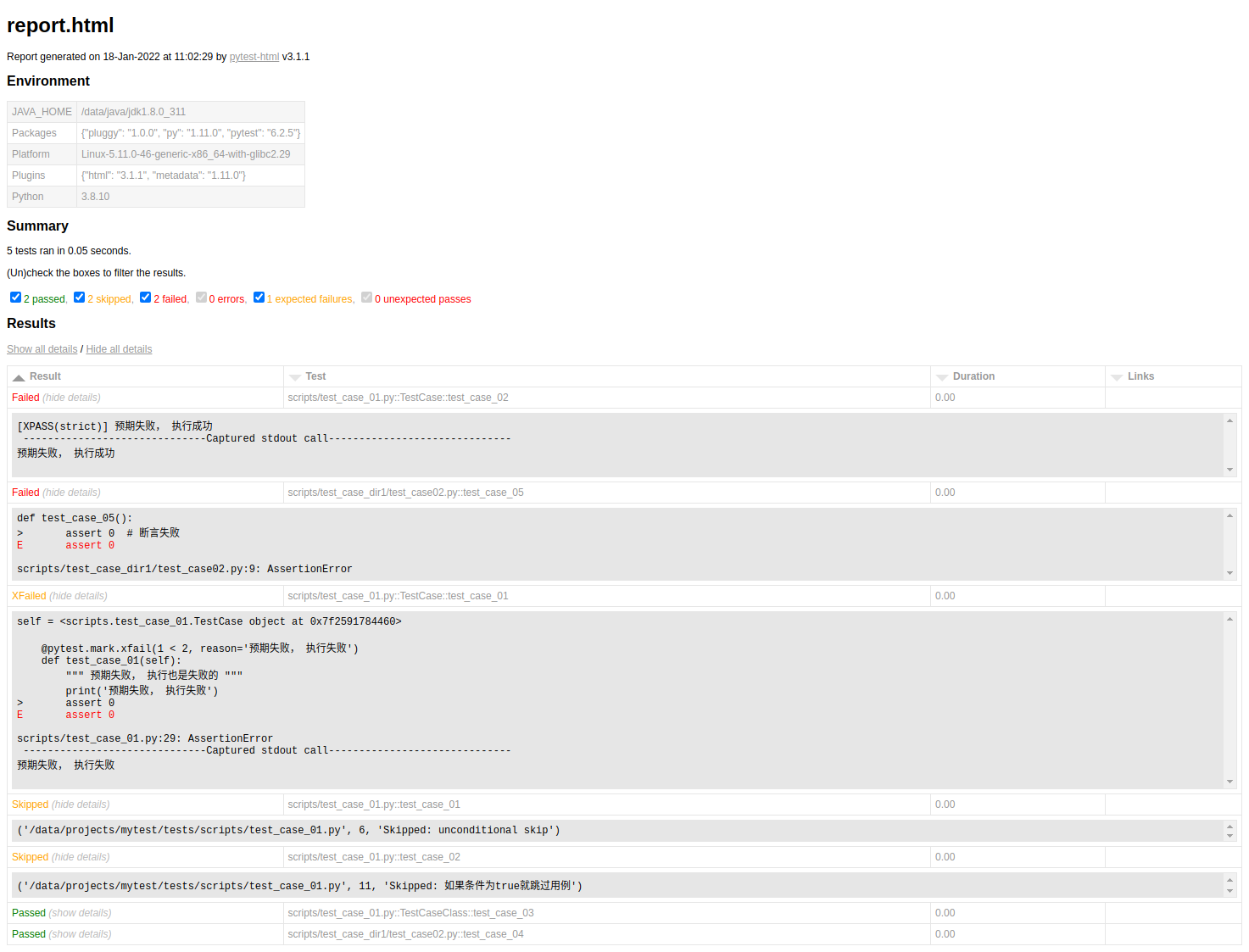
After running pytest, open report/report.html in a browser to view the formatted HTML report.
allure — Rich Reporting
Allure is a flexible, lightweight, multi-language reporting framework. It not only presents test results concisely via the web, it also lets everyone involved in the development process extract the maximum amount of useful information from day-to-day test runs.
From the developer’s and QA’s point of view, Allure reports simplify tracking common defects: failed tests can be split into bugs versus interrupted tests, and you can configure logs, steps, fixtures, attachments, timing, execution history, and integration with TMS and bug-tracking systems — so every developer and tester responsible for a feature can get as much test information as possible. From a manager’s point of view, Allure provides a clear “big picture” — covered features, where defects cluster, what the execution timeline looks like, and many other conveniences. Allure’s modularity and extensibility mean there’s almost always a way to fine-tune what you see.
Installing allure for pytest:
pip install allure-pytestThe report produced by the allure-pytest plugin alone is not an HTML file — it’s raw result data that must be “processed” further by the standalone allure command-line tool.
Installing the allure command-line tool
The allure tool depends on a Java environment, so make sure Java is installed and configured first (skip this if you already have Java set up).
Then download the tool itself:
- Official releases:
https://github.com/allure-framework/allure2 - Maven repository (often faster):
https://bintray.com/qameta/maven/allure2
After downloading and extracting the archive, add its bin/ directory to your system PATH. Verify the installation:
C:\Users\Anthony\Desktop>allure --version
2.10.0
A version number confirms the installation succeeded.
Usage
Using allure generally involves three steps:
- Configure
pytest.ini. - Write and run your test cases.
- Use the
alluretool to generate the HTML report.
Configure pytest.ini — the key addition is --alluredir ./report/result:
[pytest]
addopts =  -v -s --html=report/report.html --alluredir ./report/result
testpaths = ./scripts/
python_files = test_allure_case.py
python_classes = Test*
python_functions = test_*
# xfail_strict=true
Run pytest normally against a simple test file:
import pytest

def test_case_01():
    assert 1

def test_case_02():
    assert 0

def test_case_03():
    assert 1
After the run, a report directory is created automatically at the project root:
report.html— the HTML report generated by thepytest-htmlplugin from earlier; unrelated to allure.result/andassets/— raw result data produced by the allure plugin. At this point there’s no HTML report yet, just data files.
Next, use the allure command-line tool to turn that data into an HTML report. From the project root (on Windows, use cmd — some users report that allure is not recognized inside PyCharm’s built-in terminal, but works fine from the system terminal):
$ allure generate report/result -o report/allure_html --clean
Report successfully generated to report\allure_html
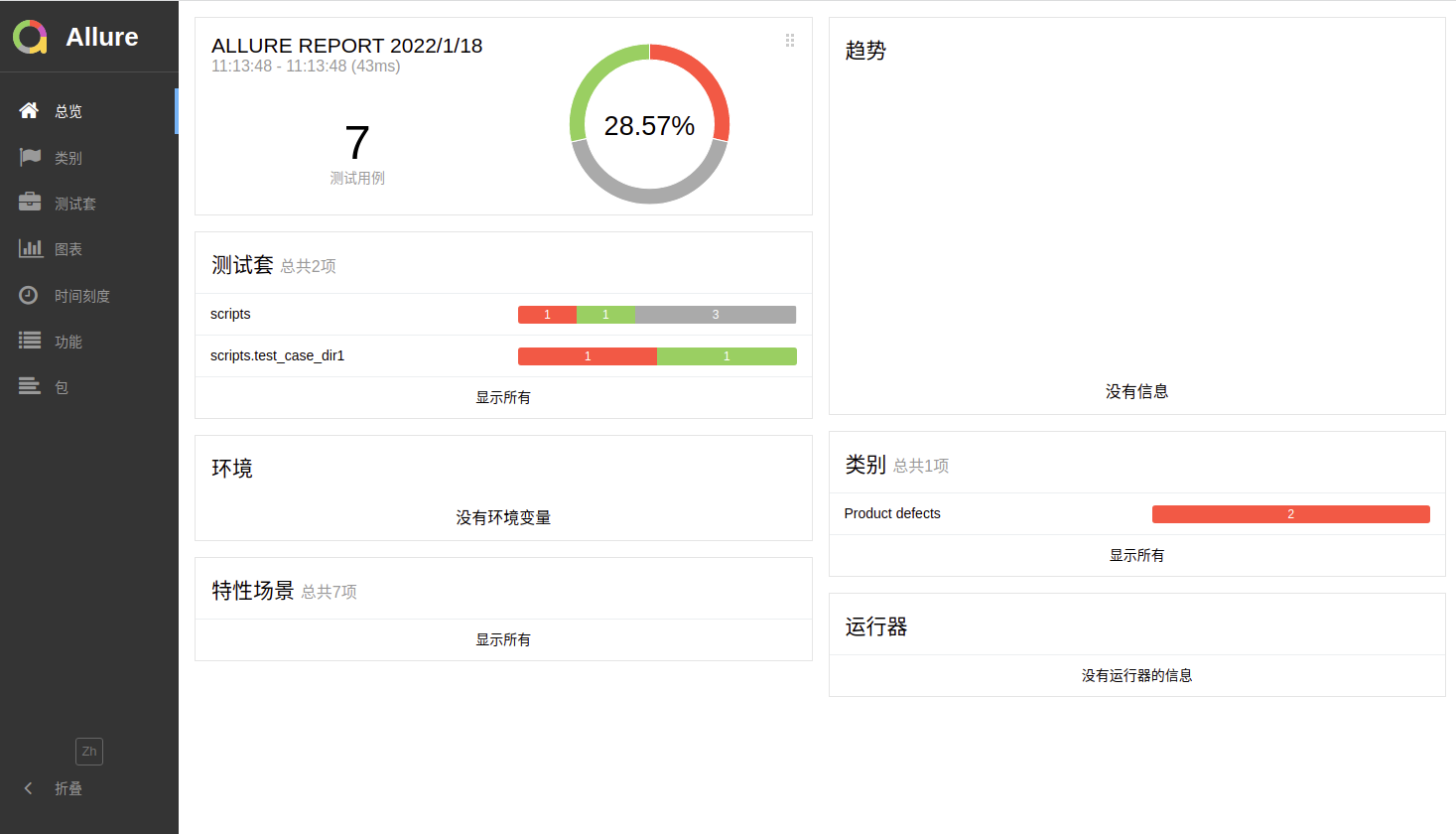
This reads the data under report/result (produced by the pytest run) and writes a new report/allure_html directory containing index.html — the final Allure HTML report. Pass --clean to wipe any previous report before regenerating.
Opening the report
By default, an Allure report needs to be served over HTTP rather than opened as a local file — one option is to serve it from an IDE, or use allure’s own open command:
$ allure open report/allure_html
Starting web server...
Server started at <http://172.16.1.147:41885/>. Press <Ctrl+C> to exit
Opening in existing browser session.
Other allure decorators
Beyond generating a basic report, allure supports several decorators you can apply while writing test cases:
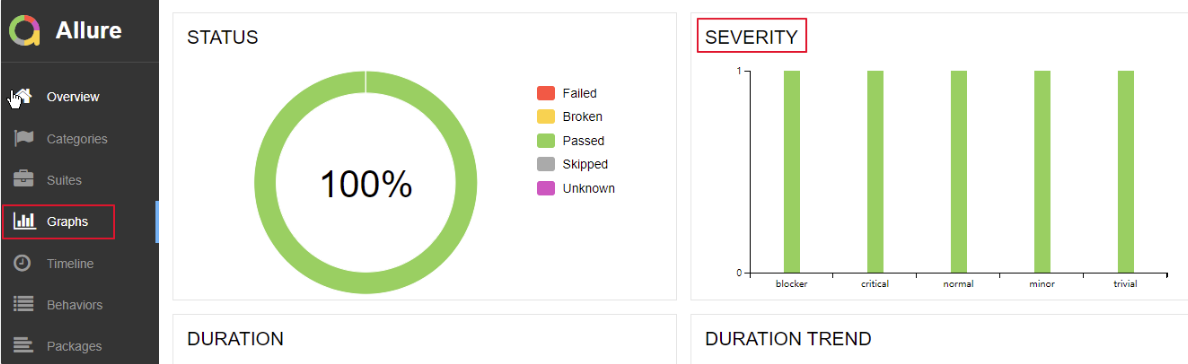
title— a custom case title (defaults to the test function name).description— a detailed description of the test case.feature/story— behavior-driven markers. Using these two markers makes the report clearly show what each test case covers and which scenario it belongs to. You can think offeatureas a module andstoryas a sub-module within it.severity— the bug severity level associated with a test case or class, one ofblocker,critical,normal,minor,trivial. Bugs are generally classified as:- Blocker: Breaks the flow entirely (client unresponsive, cannot proceed) — the system fails to run, crashes, runs out of resources, a module fails to start or exits abnormally, cannot be tested, or destabilizes the whole system.
- Critical: Affects system functionality — a major feature has a serious defect, though system stability is unaffected. For example, a service becomes completely unavailable, such as WeChat failing to send messages or Alipay failing to process payments, erroring immediately.
- Major: UI, performance, or compatibility defects — such as incorrect operation screens (including inconsistent column names/meanings in a data grid), or no progress indicator during long operations.
- Normal: Ordinary defects (e.g. numeric calculation errors) in non-core business flows — for example, Zhihu failing to let you change your avatar or nickname. What counts as “core” depends on your own definition.
- Minor/Trivial: Minor defects (e.g. missing validation hints on required fields, or inconsistent hint text) — things that hurt the experience but don’t block usage.
dynamic— set attributes such as title dynamically at runtime.
allure.title and allure.description:
import allure

@allure.title('Custom case title')
@allure.description('Detailed description of this test case')
def test_case_01():
    assert 1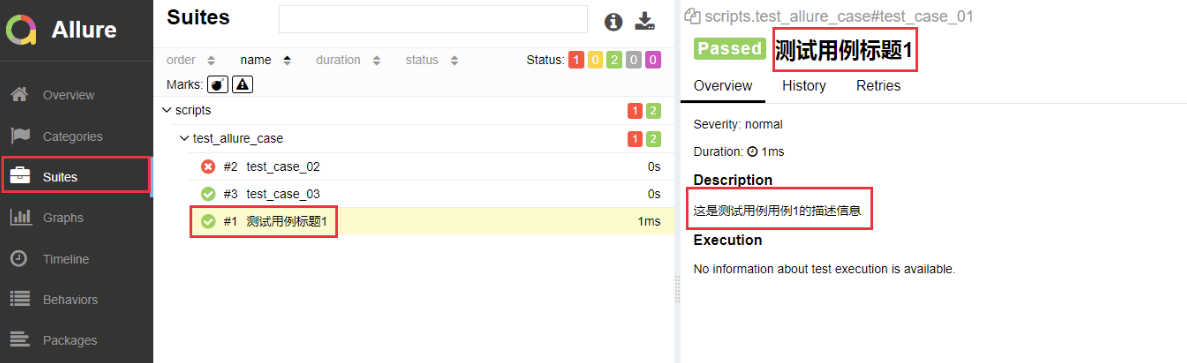
allure.feature and allure.story (BDD-style grouping):
import allure

@allure.feature('Login module')
class TestCaseLogin(object):

    @allure.story('Login module — sub-module: test1')
    def test_case_01(self):
        assert 1

    @allure.story('Login module — sub-module: test1')
    def test_case_02(self):
        assert 1

    @allure.story('Login module — sub-module: test2')
    def test_case_03(self):
        assert 1

    @allure.story('Login module — sub-module: test3')
    def test_case_04(self):
        assert 1

@allure.feature('Registration module')
class TestCaseRegister(object):

    @allure.story('Registration module — sub-module: test1')
    def test_case_01(self):
        assert 1

    @allure.story('Registration module — sub-module: test1')
    def test_case_02(self):
        assert 1

    @allure.story('Registration module — sub-module: test1')
    def test_case_03(self):
        assert 1

    @allure.story('Registration module — sub-module: test2')
    def test_case_04(self):
        assert 1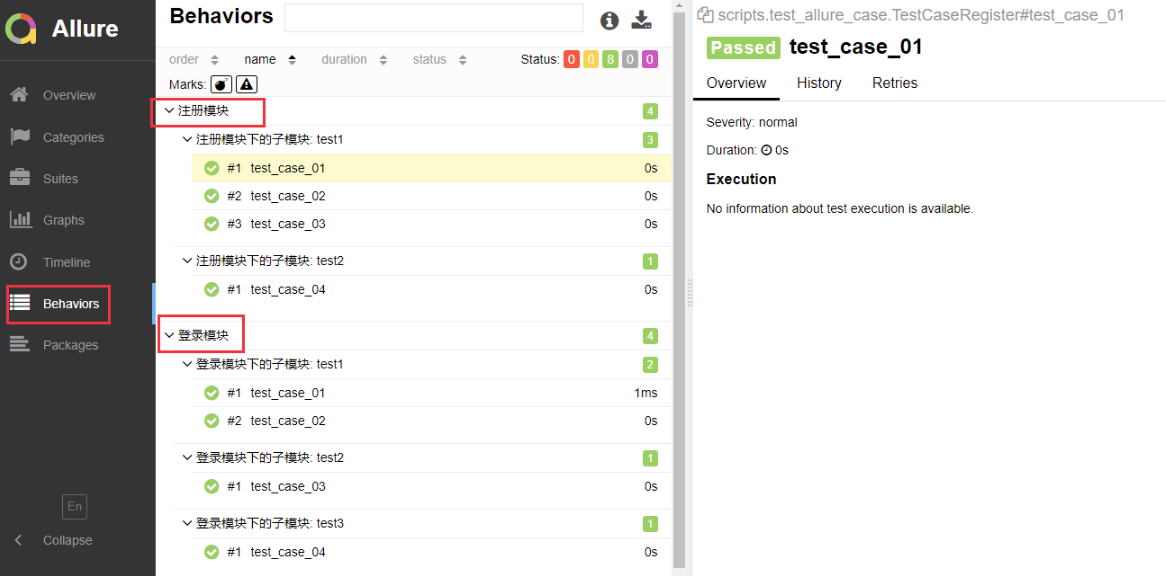
The report groups cases by feature, with story breaking each feature down into sub-scenarios, as shown above.
allure.severity (bug severity levels):
import allure

@allure.feature('Login module')
class TestCaseLogin(object):

    @allure.severity(allure.severity_level.BLOCKER)
    def test_case_01(self):
        assert 1

    @allure.severity(allure.severity_level.CRITICAL)
    def test_case_02(self):
        assert 1

    @allure.severity(allure.severity_level.MINOR)
    def test_case_03(self):
        assert 1

    @allure.severity(allure.severity_level.TRIVIAL)
    def test_case_04(self):
        assert 1

    def test_case_05(self):
        # Default severity is NORMAL — no decorator needed
        assert 1
Severity levels: BLOCKER > CRITICAL > NORMAL > MINOR > TRIVIAL. NORMAL is the default, so test_case_05 above needs no decorator.
allure.dynamic (set title/description at runtime):
import pytest
import allure

@pytest.mark.parametrize('name', ['Dynamic name 1', 'Dynamic name 2'])
def test_case(name):
    allure.dynamic.title(name)
    assert 1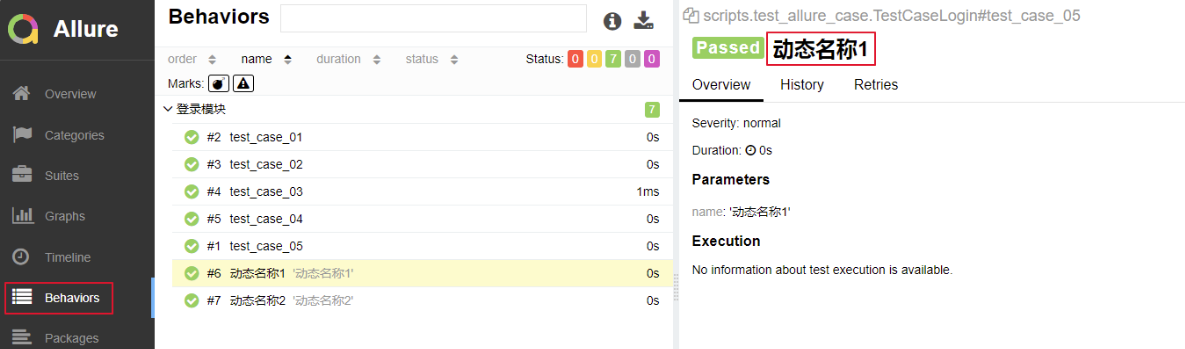
pytest-ordering — Control Execution Order
By default, cases run top-to-bottom in the order they appear in the file:
import pytest

class TestCaseClass(object):
    def test_case_03(self):
        print('Running case 03.......')
        assert 1

def test_case01():
    print('Running case 01.......')
    assert 1

def test_case02():
    print('Running case 02.......')
    assert 1
The example above runs in the order 3 1 2. To control execution order explicitly, install pytest-ordering:
pip install pytest-orderingAdd an @pytest.mark.run(order=x) decorator (x is an integer) to each case:
import pytest

class TestCaseClass(object):
    @pytest.mark.run(order=3)
    def test_case_03(self):
        assert 1

@pytest.mark.run(order=2)
def test_case01():
    assert 1

@pytest.mark.run(order=1)
def test_case02():
    assert 1
Now the execution order is 2 1 3, following the specified order values. If you mix in zero or negative numbers, the priority is:
0 > positive integers > unordered tests > negative integersPositive and negative numbers are each ordered by magnitude within their own group.
pytest-rerunfailures — Retry Failing Tests
Automatically re-run a case that fails, up to a configured number of attempts.
pip install pytest-rerunfailuresAdd --reruns=3 to addopts (keep everything else unchanged):
[pytest]
addopts = -s --html=report/report.html --reruns=3
testpaths = ./scripts/
python_files = test_case_01.py
python_classes = Test*
python_functions = test_*
If a case fails, it will now be retried up to 3 times. First, a case that keeps failing on every retry:
import pytest

def test_case01():
    print('Running case 01.......')
    assert 1  # passes

def test_case02():
    print('Running case 02.......')
    assert 0  # fails — will be retried

class TestCaseClass(object):

    def test_case_03(self):
        print('Running case 03.......')
        assert 1
collected 3 items
scripts\test_case_01.py Running case 01.......
.Running case 02.......
RRunning case 02.......
RRunning case 02.......
RRunning case 02.......
FRunning case 03.......
.
============================================================= FAILURES =============================================================
___________________________________________________________ test_case02 ____________________________________________________________
def test_case02():
print('Running case 02.......')
> assert 0 # fails — will be retried
E assert 0
scripts\test_case_01.py:19: AssertionError
=============================================== 1 failed, 2 passed, 3 rerun in 0.20s ===============================================
The case failed on the initial run and on all 3 retries, so it’s still reported as failed. Now the other scenario — the case fails initially but passes on a retry, so the remaining retries are skipped:
import random
import pytest

def test_case01():
    print('Running case 01.......')
    assert 1  # passes

def test_case02():
    print('Running case 02.......')
    status = random.randint(0, 2)
    if status:
        assert 1  # passes — no further retries needed
    else:
        assert 0  # fails — will be retried

class TestCaseClass(object):

    def test_case_03(self):
        print('Running case 03.......')
        assert 1
The random module simulates a case that fails on one run but succeeds on a retry:
collected 3 items

scripts\test_case_01.py Running case 01.......
.Running case 02.......
RRunning case 02.......
.Running case 03.......
.

==================================================== 3 passed, 1 rerun in 0.08s ====================================================
test_case02 passed after a single retry, so the remaining 2 retries were never executed.
pytest-xdist — Parallel Test Execution
Running cases one at a time is slow. pytest-xdist runs them concurrently across multiple worker processes.
pip install pytest-xdistConfigure it in pytest.ini:
[pytest]
addopts =  -v -s --html=report/report.html -n=auto
testpaths = ./scripts/
python_files = test_case_01.py
python_classes = Test*
python_functions = test_*-n=auto— detect the number of CPUs automatically.-n=4— use exactly 4 worker processes.
You can also pass -n on the command line instead of the config file:
import pytest

def test_case01():
    print('Running case 01.......')
    assert 1  # passes

@pytest.mark.skipif(condition=2 > 1, reason='Skip this case')
def test_case02():
    print('Running case 02.......')
    assert 0

class TestCaseClass(object):

    def test_case_03(self):
        print('Running case 03.......')
        assert 1

    def test_case_04(self):
        print('Running case 04.......')
        assert 1
$ pytest .\scripts\test_case_01.py -s -n auto
[gw0] win32 Python 3.6.2 cwd: M:\py_tests
[gw1] win32 Python 3.6.2 cwd: M:\py_tests
[gw2] win32 Python 3.6.2 cwd: M:\py_tests
[gw3] win32 Python 3.6.2 cwd: M:\py_tests
gw0 [4] / gw1 [4] / gw2 [4] / gw3 [4]
scheduling tests via LoadScheduling
[gw3] PASSED scripts/test_case_01.py::TestCaseClass::test_case_04
[gw0] PASSED scripts/test_case_01.py::test_case01
[gw2] PASSED scripts/test_case_01.py::TestCaseClass::test_case_03
[gw1] SKIPPED scripts/test_case_01.py::test_case02
=================================================== 3 passed, 1 skipped in 2.23s ===================================================Four worker processes (gw0–gw3) picked up the four test cases and ran them in parallel, cutting total runtime significantly.
pytest-cov — Coverage Reporting
pytest-cov adds coverage support to pytest, showing which lines of code were and weren’t exercised by the test suite.
pip install pytest-covAdd --cov=./scripts to addopts — this reports coverage for every matching script under scripts/:
[pytest]
addopts =  -v -s --html=report/report.html -n=auto --cov=./scripts
testpaths = ./scripts/
python_files = test_case_01.py
python_classes = Test*
python_functions = test_*
Run pytest as usual; a coverage table is appended to the output:
----------- coverage: platform win32, python 3.6.2-final-0 -----------
Name                          Stmts   Miss  Cover
-------------------------------------------------
scripts\demo1.py                  4      4     0%
scripts\test_allure_case.py       7      7     0%
scripts\test_case_01.py          15      2    87%
-------------------------------------------------
TOTAL                            26     13    50%
Other Noteworthy Plugins
| Plugin | Purpose |
|---|---|
pytest-sugar | Prettier output with a progress bar; no configuration needed |
pytest-picked | Runs only tests for files changed since the last git commit |
pytest-instafail | Prints failures immediately instead of waiting for the full suite |
pytest-tldr | Terse output; shows only failure tracebacks by default |
pytest-django | Full pytest support for Django apps and projects — tests with pytest fixtures instead of unittest boilerplate, and runs faster than Django’s standard test runner |
django-test-plus | Not written specifically for pytest, but now supports it. Provides its own TestCase subclass with convenience helpers (e.g. asserting specific HTTP status codes) that require far less boilerplate |
The plugins above are by no means the only way to extend pytest — the ecosystem of useful plugins is vast. Browse the pytest plugin compatibility page to explore further. Which plugins do you find most useful?