Common Encryption Algorithms
Encryption is a common topic in both frontend development and web scraping. Understanding common encryption algorithms helps you reverse-engineer obfuscated request parameters and is a key step from beginner to advanced crawler developer. This article summarizes the most commonly encountered algorithms without diving into their internal mathematical implementations.
Common encryption algorithms fall into three categories:
- Linear hash algorithms (signature algorithms) — MD5
- Symmetric encryption — AES, DES
- Asymmetric encryption — RSA
MD5
MD5 (Message Digest 5) is a widely used linear hash algorithm that produces a 128-bit (16-byte) hash value, used to verify data integrity. MD5 always produces a fixed-length output (32 hex characters or 16 hex characters in short form).
Decryption: Strictly speaking, MD5 is a one-way function and cannot be “decrypted.” However, it can theoretically be reversed via brute-force (rainbow tables): generate hashes for a huge number of inputs and compare against the target hash. The cost in time and computing power is what makes a strong MD5 hash “safe.”
Hardening MD5 (increasing crack cost):
- Generate a random meaningless private salt string → hash it with MD5 → call the result “string 1”
- Concatenate the original data with string 1 → hash again → call the result “string 2”
- Hash string 2 again → the final “string 3” is the stored password hash
Most website password hashing uses some variant of this salt-and-stretch approach.
JavaScript example:
<html>
<script src="https://cdn.bootcss.com/blueimp-md5/2.10.0/js/md5.js"></script>
<script type="text/javascript">
    var hashCode = md5("md5password!");
    alert(hashCode);
</script>
</html>
DES / AES (Symmetric Encryption)
DES (Data Encryption Standard) is a symmetric encryption algorithm — both encryption and decryption use the same secret key (a string).
AES has replaced DES as the modern standard:
| DES | AES | |
|---|---|---|
| Ciphertext block size | Multiple of 8 bytes | Multiple of 16 bytes |
| Security level | Sufficient for enterprise use | Required for high-security use |
| Key length | 56-bit effective | 128/192/256-bit |
Switching between DES and AES in CryptoJS requires only changing CryptoJS.DES to CryptoJS.AES.
Key parameters:
Key— the shared secret key (must be the same on both sides)Mode— encryption mode (ECB, CBC, etc.)Padding— padding scheme; useCryptoJS.pad.Pkcs7(fills short blocks to the required multiple)
JavaScript example:
<html>
<script src="https://cdn.bootcss.com/crypto-js/3.1.9-1/crypto-js.js"></script>
<script type="text/javascript">
    var secretKey = "12345678";  // key length must be 8, 16, or 32 characters

    var message = "Hello, world!";

    // Encrypt (switch CryptoJS.DES ↔ CryptoJS.AES to change algorithm)
    var encrypted = CryptoJS.DES.encrypt(message, CryptoJS.enc.Utf8.parse(secretKey), {
        mode: CryptoJS.mode.ECB,
        padding: CryptoJS.pad.Pkcs7
    }).toString();
    alert(encrypted);

    // Decrypt
    var decrypted = CryptoJS.DES.decrypt(encrypted, CryptoJS.enc.Utf8.parse(secretKey), {
        mode: CryptoJS.mode.ECB,
        padding: CryptoJS.pad.Pkcs7
    }).toString(CryptoJS.enc.Utf8);
    alert(decrypted);
</script>
</html>
RSA (Asymmetric Encryption)
RSA is an asymmetric encryption algorithm widely used in public-key cryptography and e-commerce.
How asymmetric encryption works:
- Two keys are required: a public key (shared openly) and a private key (kept secret).
- Data encrypted with the public key can only be decrypted with the matching private key.
- This means: anyone can encrypt a message for you using your public key, but only you can read it.
Common use cases:
- Payment password encryption on e-commerce sites
- TLS/HTTPS handshake key exchange
- Digital signatures
Key generation: Use an online tool such as web.chacuo.net/netrsakeypair or openssl genrsa.
JavaScript example (jsencrypt library):
<html>
<script src="https://cdn.bootcss.com/jsencrypt/3.0.0-beta.1/jsencrypt.js"></script>
<script type="text/javascript">
    var PUBLIC_KEY = '-----BEGIN PUBLIC KEY-----...-----END PUBLIC KEY-----';
    var PRIVATE_KEY = '-----BEGIN PRIVATE KEY-----...-----END PRIVATE KEY-----';

    // Encrypt with the public key
    var encrypt = new JSEncrypt();
    encrypt.setPublicKey(PUBLIC_KEY);
    var encrypted = encrypt.encrypt('hello!');
    alert(encrypted);

    // Decrypt with the private key
    var decrypt = new JSEncrypt();
    decrypt.setPrivateKey(PRIVATE_KEY);
    var decrypted = decrypt.decrypt(encrypted);
    alert(decrypted);
</script>
</html>
Base64 (Encoding, Not Encryption)
Base64 is an encoding scheme, not a true encryption algorithm. It represents arbitrary binary data using 64 printable characters (A-Z, a-z, 0-9, +, /). It only looks like encryption but provides zero security — anyone can decode it instantly.
<html>
<script type="text/javascript">
    // Custom Base64 object (encode/decode without relying on built-ins)
    var Base64={_keyStr:"ABCDEFGHIJKLMNOPQRSTUVWXYZabcdefghijklmnopqrstuvwxyz0123456789+/=",encode:function(e){var t="";var n,r,i,s,o,u,a;var f=0;e=Base64._utf8_encode(e);while(f<e.length){n=e.charCodeAt(f++);r=e.charCodeAt(f++);i=e.charCodeAt(f++);s=n>>2;o=(n&3)<<4|r>>4;u=(r&15)<<2|i>>6;a=i&63;if(isNaN(r)){u=a=64}else if(isNaN(i)){a=64}t=t+this._keyStr.charAt(s)+this._keyStr.charAt(o)+this._keyStr.charAt(u)+this._keyStr.charAt(a)}return t},decode:function(e){var t="";var n,r,i;var s,o,u,a;var f=0;e=e.replace(/[^A-Za-z0-9+/=]/g,"");while(f<e.length){s=this._keyStr.indexOf(e.charAt(f++));o=this._keyStr.indexOf(e.charAt(f++));u=this._keyStr.indexOf(e.charAt(f++));a=this._keyStr.indexOf(e.charAt(f++));n=s<<2|o>>4;r=(o&15)<<4|u>>2;i=(u&3)<<6|a;t=t+String.fromCharCode(n);if(u!=64){t=t+String.fromCharCode(r)}if(a!=64){t=t+String.fromCharCode(i)}}t=Base64._utf8_decode(t);return t},_utf8_encode:function(e){e=e.replace(/rn/g,"n");var t="";for(var n=0;n<e.length;n++){var r=e.charCodeAt(n);if(r<128){t+=String.fromCharCode(r)}else if(r>127&&r<2048){t+=String.fromCharCode(r>>6|192);t+=String.fromCharCode(r&63|128)}else{t+=String.fromCharCode(r>>12|224);t+=String.fromCharCode(r>>6&63|128);t+=String.fromCharCode(r&63|128)}}return t},_utf8_decode:function(e){var t="";var n=0;var r=c1=c2=0;while(n<e.length){r=e.charCodeAt(n);if(r<128){t+=String.fromCharCode(r);n++}else if(r>191&&r<224){c2=e.charCodeAt(n+1);t+=String.fromCharCode((r&31)<<6|c2&63);n+=2}else{c2=e.charCodeAt(n+1);c3=e.charCodeAt(n+2);t+=String.fromCharCode((r&15)<<12|(c2&63)<<6|c3&63);n+=3}}return t}}

    // Sample string
    var string = 'i am bobo!';

    // Encode
    var encodedString = Base64.encode(string);
    alert(encodedString);

    // Decode
    var decodedString = Base64.decode(encodedString);
    alert(decodedString);
</script>
</html>= or ==, using only alphanumeric characters plus + and /), try decoding them with atob() in the browser console or Python’s base64.b64decode(). They are often not encrypted at all.How HTTPS Works
HTTPS = HTTP + SSL/TLS. It ensures all data transmitted over the network is encrypted. Here is the evolution that led to HTTPS:
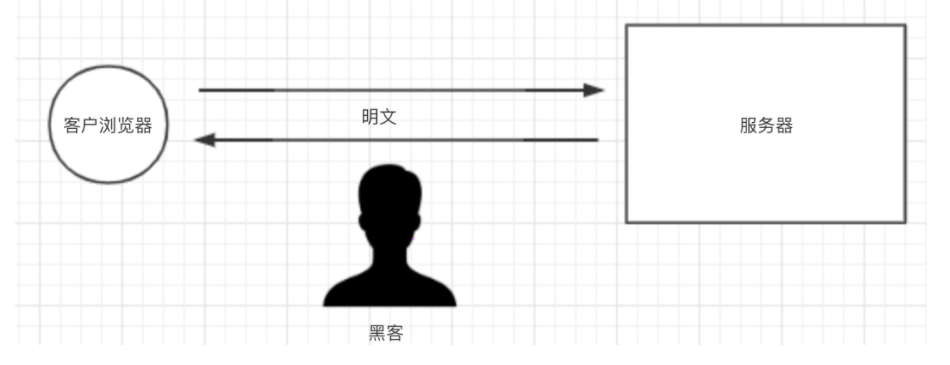
Stage 1 — Plain HTTP: Before HTTPS existed, all sites used plain HTTP, and all data was transmitted in plaintext — trivially intercepted or tampered with.
Stage 2 — Symmetric encryption: To prevent leaks and tampering, the data is encrypted — for example, generate a symmetric key (DKUFHNAF897123F) and hand it to both the browser and the server; every message between them is then encrypted and decrypted with that same key.
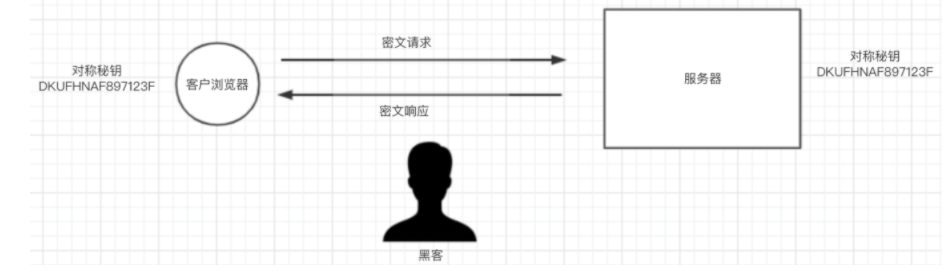
Request/response flow:
- The client encrypts the request with the symmetric key and sends it to the server.
- The server decrypts the ciphertext with the symmetric key, processes the request, encrypts the response with the same key, and returns it.
- The client decrypts the response with the symmetric key to get the final content.
This way all transmitted data is ciphertext, solving the plaintext problem — but it introduces a new bug: how does the browser obtain the symmetric key in the first place? Since every client uses the same symmetric key, if the browser can get it, so can an attacker, which makes the encryption pointless.
Stage 3 — Asymmetric + symmetric hybrid: To make the symmetric key dynamic and let the client and server exchange it safely, asymmetric encryption is introduced.
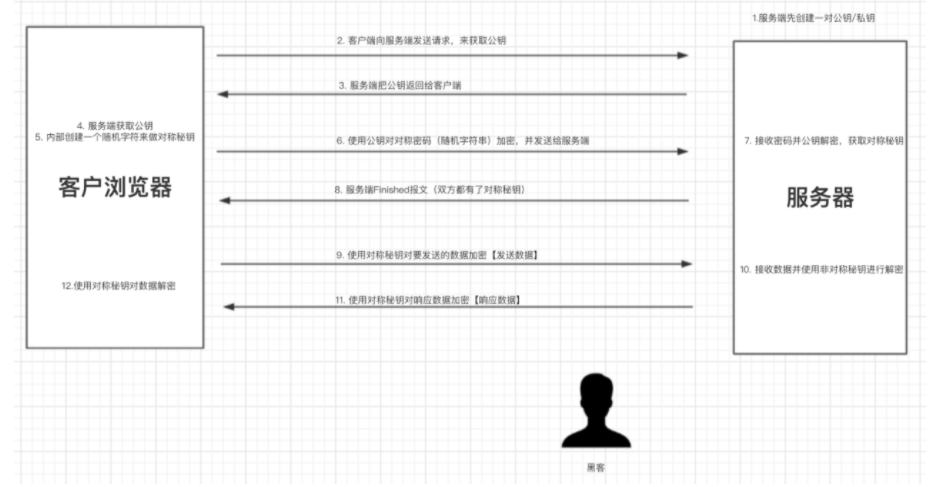
This solves both the dynamic-key problem and the data-encryption problem: each user’s symmetric key is randomly generated and transmitted encrypted with the public key (data encrypted with the public key can only be decrypted with the private key), so an attacker cannot intercept the symmetric key. And since the actual data is encrypted with the symmetric key, even if an attacker captures it, they cannot decrypt it. This looks airtight, but it still has a bug: if an attacker intercepts the exchange at the “server sends its public key” step and substitutes their own public key, the client will encrypt the symmetric key with the attacker’s public key instead. The attacker then intercepts the request, decrypts the symmetric key with their own private key, and everything downstream is compromised.
Stage 4 — CA certificates: Using a CA (Certificate Authority) certificate solves the hijacking problem.
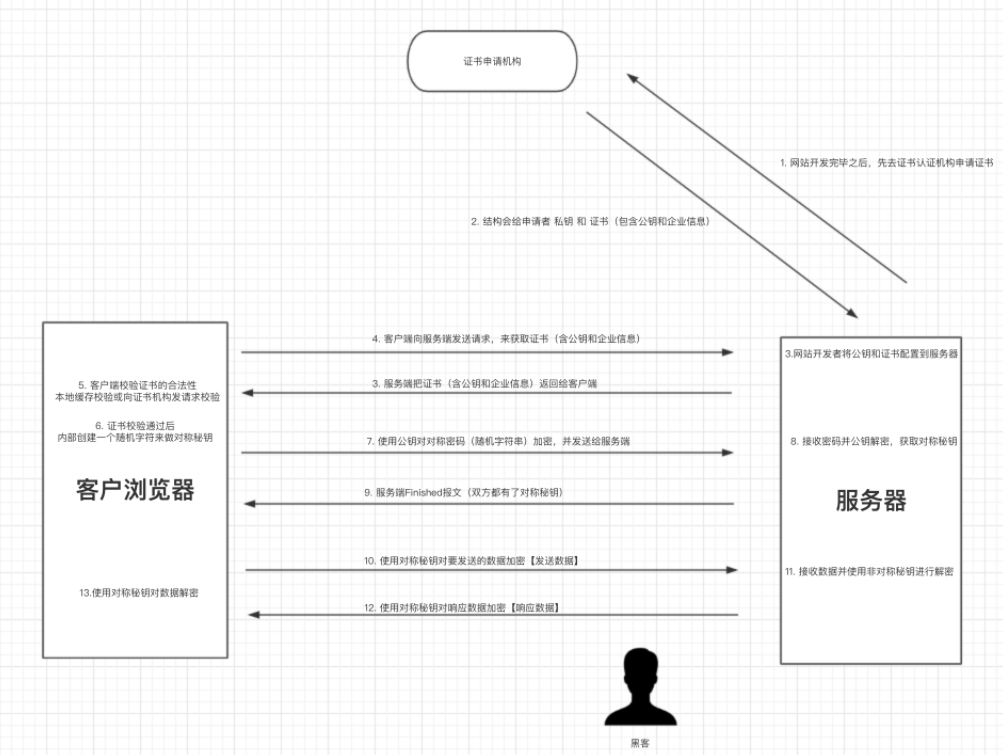
This closes the hijacking hole: even if an attacker intercepts the connection and returns their own certificate, it will fail certificate verification, and the browser will show a security warning instead of silently accepting the fake key.
This four-stage evolution is the foundation of HTTPS security. The trade-off: repeated encryption/decryption adds latency, but the security benefit far outweighs the cost.